DOCUBIRD
Sign in Start free
Electronic signatures for small businesses

Get it signed. Today.

Docubird is e-signature for freelancers, consultants and small teams. Send a contract, proposal or NDA in minutes, see exactly who you’re waiting on, and get back a sealed PDF anyone can check.

Free plan · 3 signing requests a month · Signers never need an account
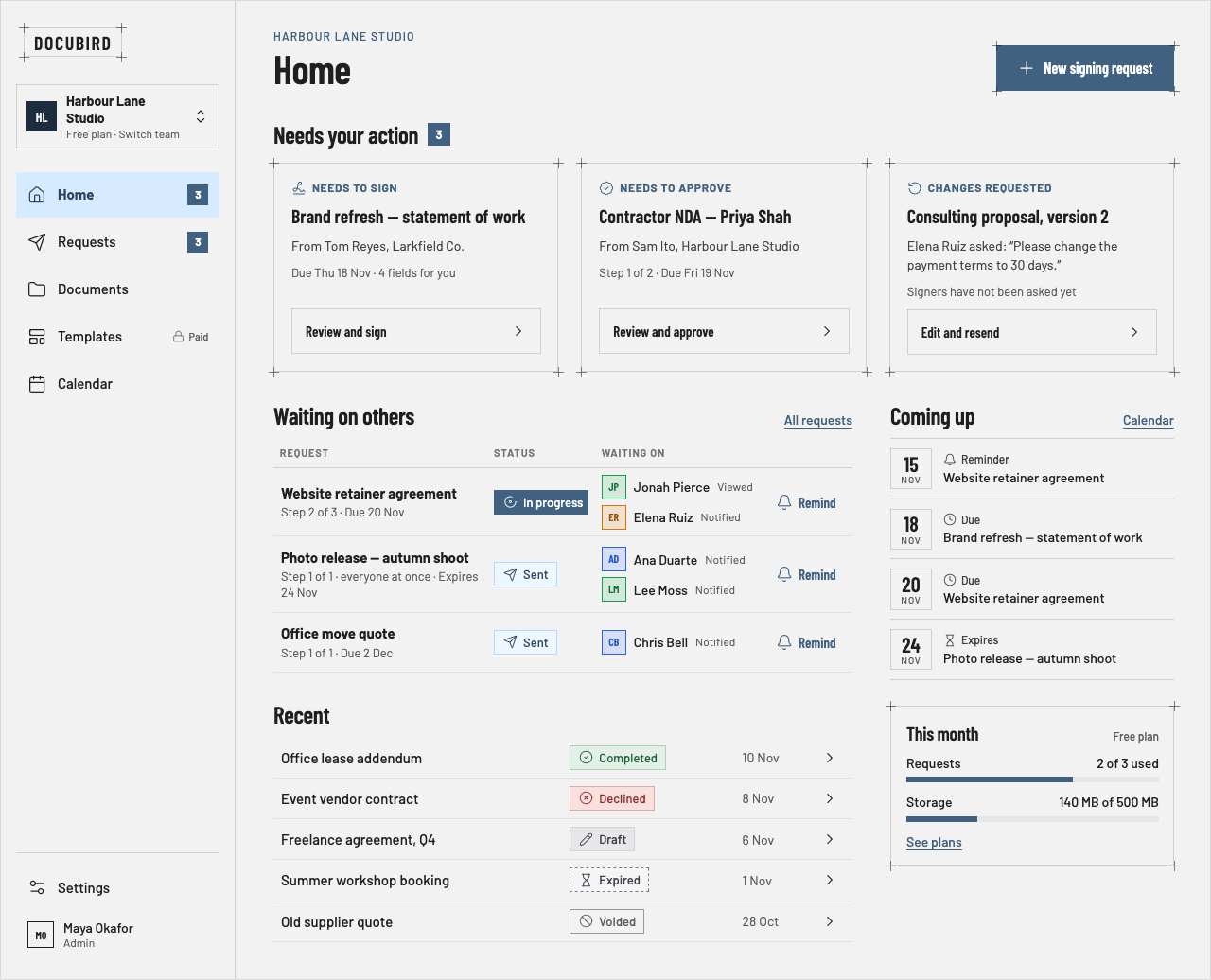
Fig. 01 — Home · Desktop 1280Fig. 02 — Guest signing · Phone 390
Docubird Home: requests that need your action, who you are waiting on with Remind buttons, recent requests with status badges, and upcoming due dates What needs you01 Who you’re waiting on02 Remind in one tap03
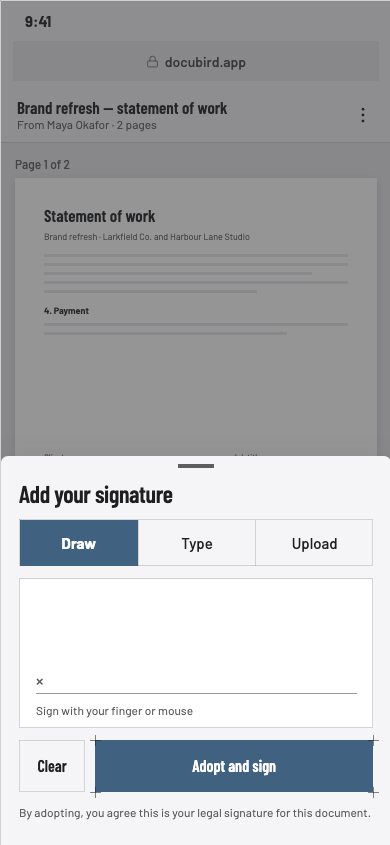
A guest adding their signature on a phone: Draw, Type or Upload, then Adopt and sign
Made forPeople without a legal team
FreelancersProposals, retainers and statements of work.
ConsultantsNDAs and engagement letters with an approval step.
Small teamsShared requests, templates and one calendar of due dates.See all 10 industries →
How it works

From PDF to sent in three steps

Upload a PDF or Word file, or write one in the built-in editor. Docubird walks you through the rest and won’t let you send until every signer has somewhere to sign.
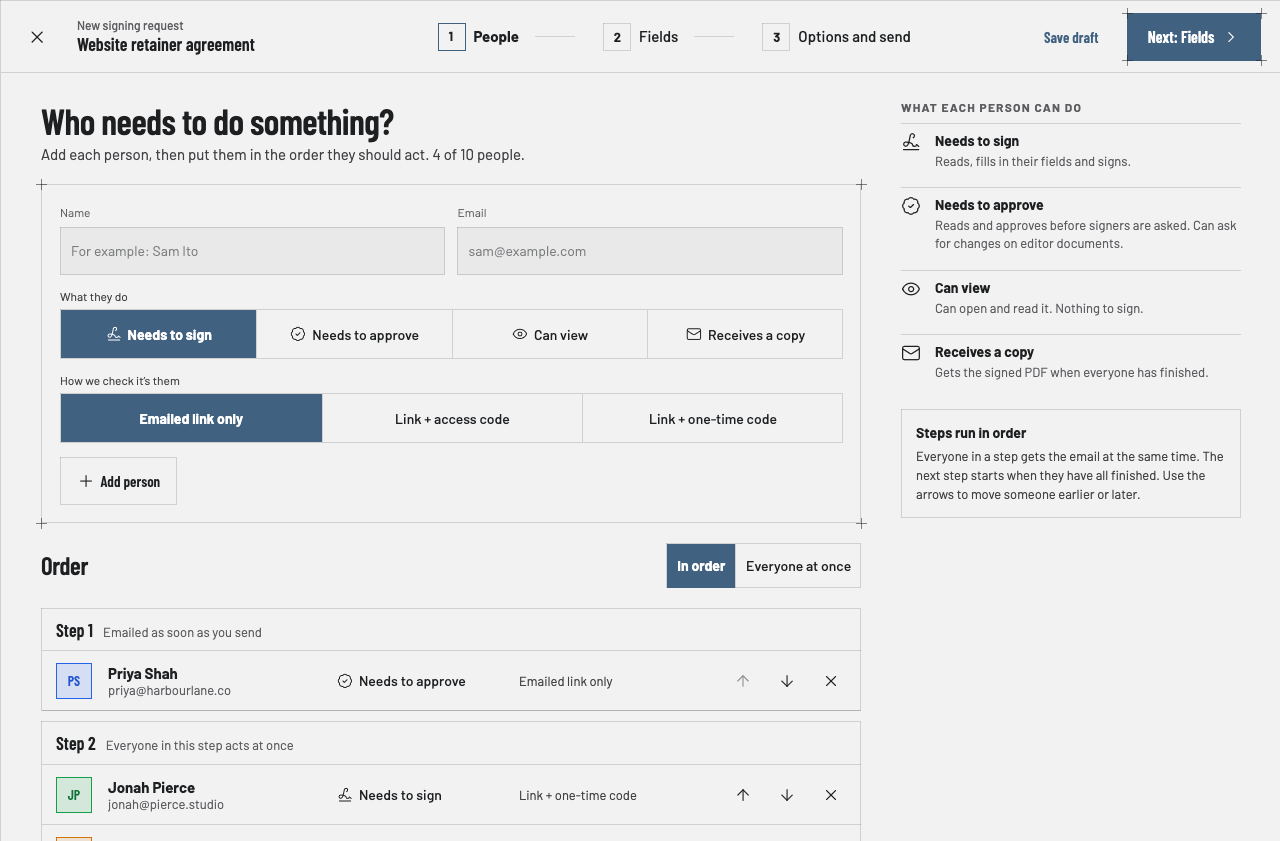
Adding people to a signing request and putting them in steps
Fig. 03a — PeopleStep 1 of 3
For the people you send to

No app. No account. Just the link.

Your client opens the email on whatever phone is in their hand. They agree to sign electronically, read the document, fill in what’s theirs and sign — drawn, typed or uploaded. Most people are done before they put the phone down.
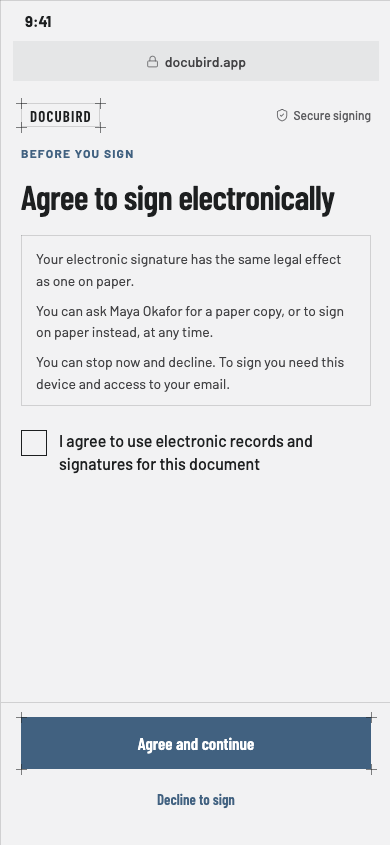
  1. Consent to sign electronically on a phone
    01AgreeA plain-language consent screen, recorded before anything is filled.
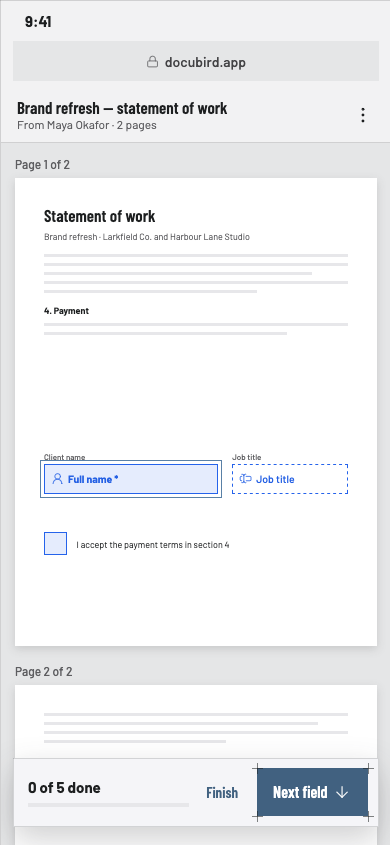
  2. Reading a document on a phone with highlighted fields to fill
    02ReadThe real pages, with their fields highlighted and a count of what’s left.
  3. Drawing a signature on a phone
    03SignDraw with a finger, type a name, or upload an image.
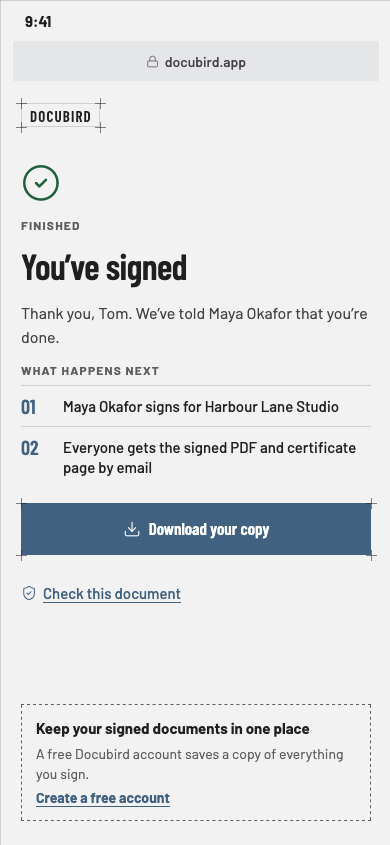
  4. Finished screen with what happens next and Download your copy
    04DoneThey see what happens next and can download their copy.
Follow along

Always know who’s holding things up

See every step
Approvers go first, signers next, copies last. Each step shows who’s done and who hasn’t opened it yet.
Know when they’ve looked
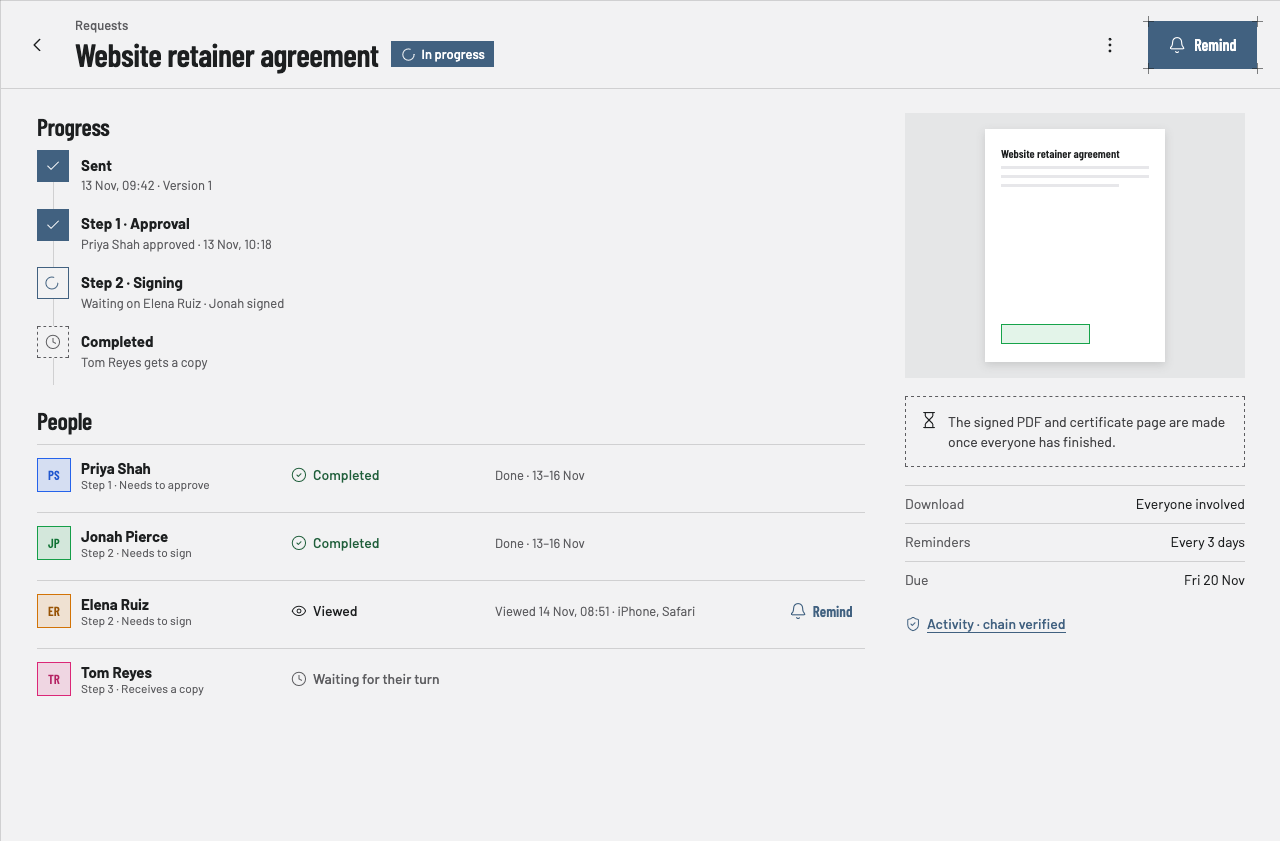
“Viewed 14 Nov, 08:51 · iPhone, Safari.” No more guessing whether the email arrived.
Reminders that send themselves
Set them every few days, or tap Remind yourself. Due dates and expiries land in your calendar.
Request detail showing progress through approval and signing steps, each person’s status, and a Remind button for the person who hasn’t signed
Fig. 04 — Request detail · In progress
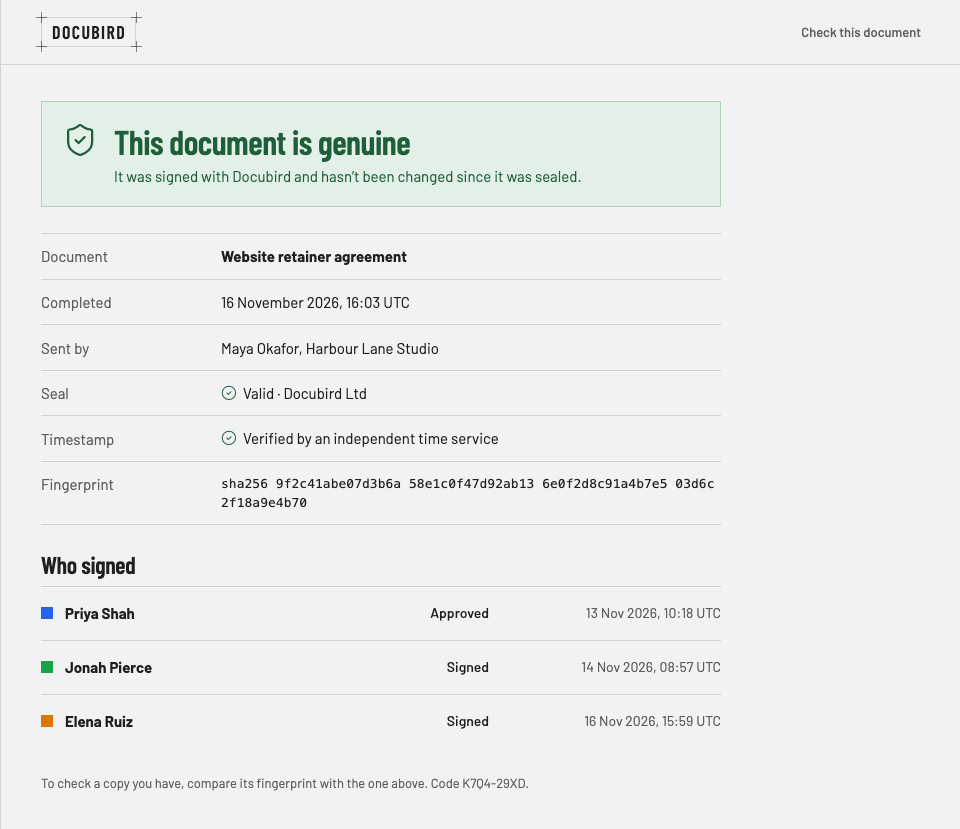
The public Check this document page confirming a document is genuine, with seal, timestamp, fingerprint and who signed
Fig. 05 — Check this document · Public page
Proof that holds up

Every signature comes with a receipt

When the last person signs, Docubird seals the PDF and adds a certificate page: who signed, when, and from where. Its QR code opens a public page anyone can use to check the document hasn’t been changed.

Sealed PDFPlus a certificate page
Independent timestampFrom an outside time service
Recorded consentBefore any field is filled
Verified signersAccess code or one-time code
Everything else

Small tool. Nothing missing.

  • 01

    Approval before signing

    Put a manager or client lead in step 1. Signers aren’t asked until they approve.

  • 02

    Changes requested

    Approvers can ask for edits. Fix the document, publish a new version, and it carries on.

  • 03

    Write it in Docubird

    A built-in editor with colour-coded placeholders for each person.

  • 04

    Sign it myself

    Need your own signature on a form? Place your fields, sign, download.

  • 05

    Templates

    Save the agreements you send every week and reuse them in seconds. Paid plans.

  • 06

    Calendar

    Every due date, reminder and expiry in one place.

  • 07

    Who can download

    Everyone involved, your team only, or only people you grant access.

  • 08

    Phone, tablet, web

    One app on iPhone, Android and the browser. Light and dark mode.

Plans

One price for the whole team.

Unlimited signing requests on every paid plan, and no per-seat fees. Prices exclude VAT, billed yearly.

Free

For the occasional contract
£0
  • Signing requests3 a month
  • People1
  • Storage500 MB
  • Templates—
Create a free account

Solo

For freelancers and consultants
£9a month
  • Signing requestsUnlimited
  • People1
  • Storage10 GB
  • TemplatesIncluded
Start Solo

Team

Most popular
For small teams, up to 5 people
£29a month
  • Signing requestsUnlimited
  • PeopleUp to 5
  • Storage50 GB
  • Templates and download accessShared
Start Team

Business

For growing teams, up to 15 people
£59a month
  • Signing requestsUnlimited
  • PeopleUp to 15
  • Storage200 GB
  • Templates and download accessShared
Start Business
Monthly billing: Solo £11, Team £35, Business £71. Charities get 30% off.Compare every feature →
Questions

Good to know

Do the people I send to need a Docubird account?+

No. They open the link in their email on any phone or computer, read the document and sign. No app and no account.

What can I send for signature?+

Upload a PDF or Word file, or write the document in the built-in editor. You can add up to ten people per request.

How do I know the right person signed?+

Every request uses an emailed link. For more certainty, add an access code you share with them, or have Docubird email a one-time code when they open it.

How can someone check a signed document is genuine?+

Every completed request ends with a sealed PDF and a certificate page. Scanning its QR code opens a Check this document page showing who signed, when, and whether the file has changed.

What if someone wants changes?+

Approvers can approve, decline with a reason, or — if you wrote the document in the editor — ask for changes. Signers can sign or decline.

Is there a free plan?+

Yes. The free plan includes 3 signing requests a month and 500 MB of storage. Templates are on paid plans.

Your next contract, signed by Friday.

Three free requests every month. Set up in the time it takes to find the PDF.

Send your first request free